
More alive
Energy and presence feel closer without turning the result into a harsh loudness trick.
ArSonKuPik helps creators shape body, vocal focus, stereo depth and polished air through one Mas Ari Signature engine, six intuitive controls and practical professional presets.
No account or card · No subscription · No automatic charge · Optional activation only
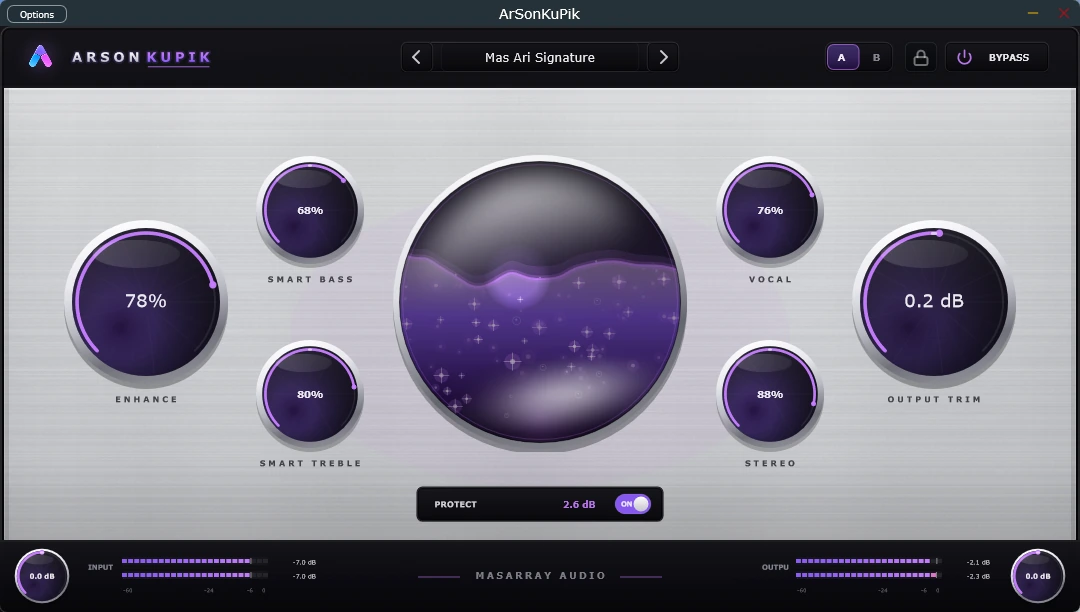
The one immutable engine behind every preset is built to make familiar recordings feel more alive, reveal fine detail and create a convincing live-music impression—without asking the listener to manage a complex technical chain.
Energy and presence feel closer without turning the result into a harsh loudness trick.
Low-level texture, vocal articulation and polished air become easier to perceive.
A grounded centre with deeper space creates a more convincing sense of performance.
Controlled low-end weight that supports the music without swallowing the mix.
Vocals and important elements remain readable inside dense material.
Width and depth expand while the centre remains musically grounded.
Openness and fine detail without forcing brittle or tiring brightness.
Gain Match is OFF by default so the intended safe enhancement remains obvious. Turn Gain Match ON only when you want a strict level-equal tonal comparison.
Use a song, vocal, instrument, podcast or mix that you already know well.
Begin with Signature Balanced, then explore a preset created for your exact role.
Listen normally for the full enhancement; enable Gain Match when judging tonal change without loudness bias.
The sound controls are simple once the audio reaches the application. Choose the workflow that matches where your audio comes from.
Load ArSonKuPik as an effect on a track, vocal, bus or master inside a compatible host.
Open the separate application, choose the source input, then choose the speaker, soundcard or headphones as output.
Route Windows playback through VB-CABLE into ArSonKuPik Standalone, then send the processed result to your audio device or TWS.
Every control has a clear listening purpose, so beginners can move quickly while experienced users can refine the result with intention.
Controls the overall musical enhancement amount.
Listen for: energy, cohesion and polishAdds controlled low-end weight and body.
Listen for: fullness without boom or maskingReveals clarity, openness and polished air.
Listen for: detail without brittle fatigueBrings lead presence forward inside a busy mix.
Listen for: articulation, focus and intelligibilityCreates width and depth around a grounded centre.
Listen for: space without blur or a hollow middleProvides final protection when the output becomes hot.
Verify final peak and loudness with your normal metersEvery preset is a lightweight starting point over the same Mas Ari Signature engine. Save, load, rename and delete your own presets without rebuilding the sound from zero.
The authoritative Mas Ari Signature balance.
Transparent Polish · Open & Detailed · Warm Glue
Dense Mix Clarity · Dark Mix Lift · Bright Mix Safe
Punch & Separation
Vocal Forward & Silky · Guitar Definition & Body · Bass Authority · Drums Punch & Skin · Acoustic Natural Air
Use the Windows installer for the simplest setup, or choose the official VST3, Standalone and DMG package for your operating system. The beginner guide explains what to open after installation.
Installs the VST3 to the standard location and includes the Standalone application.
Download free for WindowsInspect and place the VST3 bundle manually when you manage plug-in files yourself.
Download Windows VST3 ZIPRun the separate Windows application without a DAW, subject to audio-device configuration.
Download Windows Standalone ZIPUniversal for Apple Silicon and Intel. Ad-hoc signed, without Developer ID signing or notarization.
Download Mac DMGSHA256SUMS.txt from the same release.Get-FileHash .\ArSonKuPik-v0.5.26-Windows-x64-Setup.exe -Algorithm SHA256Open SHA256SUMS.txtWindows packages are not commercially code-signed. macOS packages are ad-hoc signed and not notarized. Keep normal operating-system security enabled and stop when the checksum differs.
Transparent distribution: the website points only to official repository releases, validates release URLs before applying them and keeps SHA-256 verification visible.
Every preset and editing control is available during a full-featured evaluation. There is no account, payment card, subscription, automatic renewal or automatic charge.
Optional support and activation detailsA focused, musical Windows and macOS VST3 and Standalone audio enhancer for master, mix bus, tracks, vocals, podcasts, creative processing and everyday listening.
It is the single enhancement engine behind every preset, created to make familiar music feel more alive, reveal fine detail and produce a convincing live-like dimension without requiring a complex chain.
VST3 runs inside a compatible DAW. Standalone runs as a separate application and needs a selected input and output. Open the beginner usage guide.
Yes. Route Windows playback to VB-CABLE, select CABLE Output as the ArSonKuPik Standalone input, then select your speaker, soundcard, audio interface, headphones or TWS as output. Follow the routing guide.
Standalone does not automatically capture laptop audio. Verify that its input carries a signal and that its output is the real listening device. The guide includes a no-sound checklist.
Every preset and editing control is available for 365 days from first launch on each computer, without an account, card, subscription, automatic charge or purchase obligation.
Existing projects, saved values, meters, automation playback and audio processing are designed to continue in project-safe read-only mode. Optional activation is relevant only for continued editing.
Yes, during the evaluation for personal and commercial audio-production work, subject to the EULA. Your audio and projects remain yours.
Normal operation has no intentional audio upload, crash analytics or usage analytics. One quiet latest-release metadata check may occur after 30 seconds, no more than once per 24 hours; manual checks are also available.
Windows packages are unsigned and macOS packages are not notarized. Download only from the official release, verify SHA-256 and keep normal operating-system security enabled.
Start with Mas Ari Signature, compare at a similar loudness and keep the processing only when the result is genuinely more musical.